



Chevy Safety Assist Features Explained

Olson Chevrolet · Redwood Falls, MN
Chevy Safety Assist Features Explained: What Each One Does on the Road
Ever had the car ahead stop short and felt your stomach drop? That split second is exactly what Chevrolet designed its safety technology around. Here at Olson Chevrolet in Redwood Falls, we hear questions about these systems every day, so here's a straightforward guide. Let's walk through the Chevy Safety Assist features, what each one does behind the wheel, and why they work so well as a team.
Key Takeaways
- Chevy Safety Assist bundles six advanced safety features into one package that comes standard on many new Chevrolet models.
- Forward collision alert and automatic emergency braking team up to help you avoid or lessen front-end crashes.
- Lane keep assist uses a gentle steering nudge when you start drifting out of your lane unintentionally.
- Blind zone alerts, rear cross traffic alert, and other available tech build on that foundation.
- Every one of these systems supports an attentive driver. None of them replaces one.

What Is Chevy Safety Assist?
So, what is Chevy Safety Assist, exactly? It's Chevrolet's name for a group of six safety technologies bundled together: automatic emergency braking, front pedestrian braking, forward collision alert, lane keep assist with lane departure warning, following distance indicator, and IntelliBeam auto high beams. Think of it as a second set of eyes that never gets tired or distracted.
Chevy Safety Features Explained, One at a Time
Here are the core Chevy safety features explained.

Forward Collision Alert
How does forward collision warning on a Chevy work? Chevrolet calls it forward collision alert, and it watches the road ahead for a vehicle you're following. If it detects a potential front-end collision, it warns you so you can react quickly. With the available Safety Alert Seat, you'll feel a seat vibration instead of a beep.

Automatic Emergency Braking
Chevy automatic emergency braking works hand in hand with that alert. If a crash with a detected vehicle ahead seems imminent and you haven't responded, the system can apply the brakes to help you avoid the collision or reduce its severity.

Front Pedestrian Braking
This one looks for people rather than cars. If it detects a pedestrian directly ahead, it can help you avoid or reduce the risk of a collision. That matters on busy streets and in crowded parking lots.

Lane Keep Assist with Lane Departure Warning
Lane keep assist on a Chevy reads the lane markings and, if you start drifting out unintentionally, gives the steering wheel a brief, gentle turn to guide you back. Use your turn signal, and it knows the lane change is on purpose. Lane departure warning adds an alert if you keep drifting.

Following Distance Indicator
Ever wonder if you're tailgating? This feature shows your gap time, in seconds, to the vehicle you're following. Simple, but it builds better habits.

IntelliBeam Auto High Beams
IntelliBeam automatically turns your high beams on and off based on surrounding traffic. On dark rural roads around Redwood Falls, that means more light when it's safe, without blinding oncoming drivers.
Chevy Driver Assistance Features Beyond the Core Six
Safety Assist is the foundation, but many models offer more Chevy driver assistance features on top of it.

Side Blind Zone Alert
Chevrolet's version of Chevy blind-spot monitoring lights up an indicator in your side mirror when a vehicle is in your blind spot. Some models add Blind Zone Steering Assist for extra help on the highway.

Rear Cross Traffic Alert
Backing out of a crowded lot? Rear cross-traffic alert for a Chevy warns you about traffic approaching from the left or right behind you. The available version with braking can even apply the brakes to help you avoid a backing collision. Adaptive cruise control, rear park assist, and HD Surround Vision are also available on select models.
Why Chevy Active Safety Systems Work So Well Together
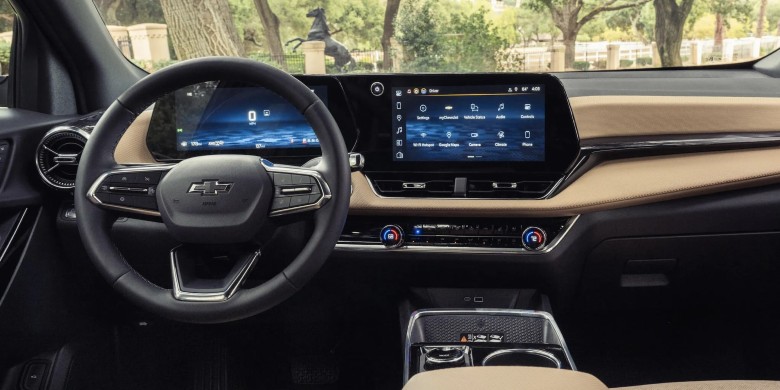
What makes Chevy active safety systems so effective is the layering. One feature spots a hazard, another warns you, and a third can step in if you need help. One honest tip from our team: Minnesota snow and road grime can cover cameras and sensors, so keep them clean in winter. These features never replace your own attention.

Frequently Asked Questions
Is Chevy Safety Assist standard on every new Chevrolet?
It's standard on many new Chevy models, but equipment varies by model and trim. We'll gladly confirm what's included.
Can I turn off lane keep assist?
Yes. On most models, you can switch it off with a button or through the vehicle settings. Your Owner's Manual has the details for your specific Chevy.
Does automatic emergency braking work in snow?
It can, but weather, visibility, and road conditions may affect performance. Keeping the windshield camera area and sensors clear helps the system do its job.

Olson Chevrolet in Redwood Falls
Looking for more before you visit?
Our Research Page brings together model guides, comparisons, blogs and local pages to help you plan your next Chevy.
Contact Olson Chevrolet of Redwood Falls
Send us a message or stop by. We serve drivers from Redwood Falls and communities across southwest Minnesota.
Visit Our Dealership
Olson Chevrolet of Redwood Falls1300 E Bridge St, Redwood Falls, MN 56283 Get Directions
Hours
| Monday | 8:00AM - 6:00PM |
| Tuesday | 8:00AM - 6:00PM |
| Wednesday | 8:00AM - 6:00PM |
| Thursday | 8:00AM - 6:00PM |
| Friday | 8:00AM - 6:00PM |
| Saturday | 8:00AM - 4:00PM |
| Sunday | Closed |
| Monday | 8:00AM - 5:00PM |
| Tuesday | 8:00AM - 5:00PM |
| Wednesday | 8:00AM - 5:00PM |
| Thursday | 8:00AM - 5:00PM |
| Friday | 8:00AM - 5:00PM |
| Saturday | 8:00AM - 12:00PM |
| Sunday | Closed |
| Monday | 8:00AM - 5:00PM |
| Tuesday | 8:00AM - 5:00PM |
| Wednesday | 8:00AM - 5:00PM |
| Thursday | 8:00AM - 5:00PM |
| Friday | 8:00AM - 5:00PM |
| Saturday | 8:00AM - 12:00PM |
| Sunday | Closed |